Getting started · September 28–October 4, 2026
Find your way around Unroll in a familiar language

Planning a gathering already involves plenty of small decisions. Finding the right button on a photo-sharing website should be one of the easy ones. With its October 2 update, Unroll made more of its key website controls available in different languages, so getting started can feel a little more familiar.
Start with the language you prefer
On the Unroll homepage, look for the language selector near the top of the page. Choose your preferred language from the list. The welcome message and key navigation labels change immediately.
For example, choose Español and the button to create an event becomes “Crear un evento.” The sign-in link becomes “Iniciar sesión.” If you are helping a friend get started, choosing a language they recognise is a simple first step before walking through the page together.
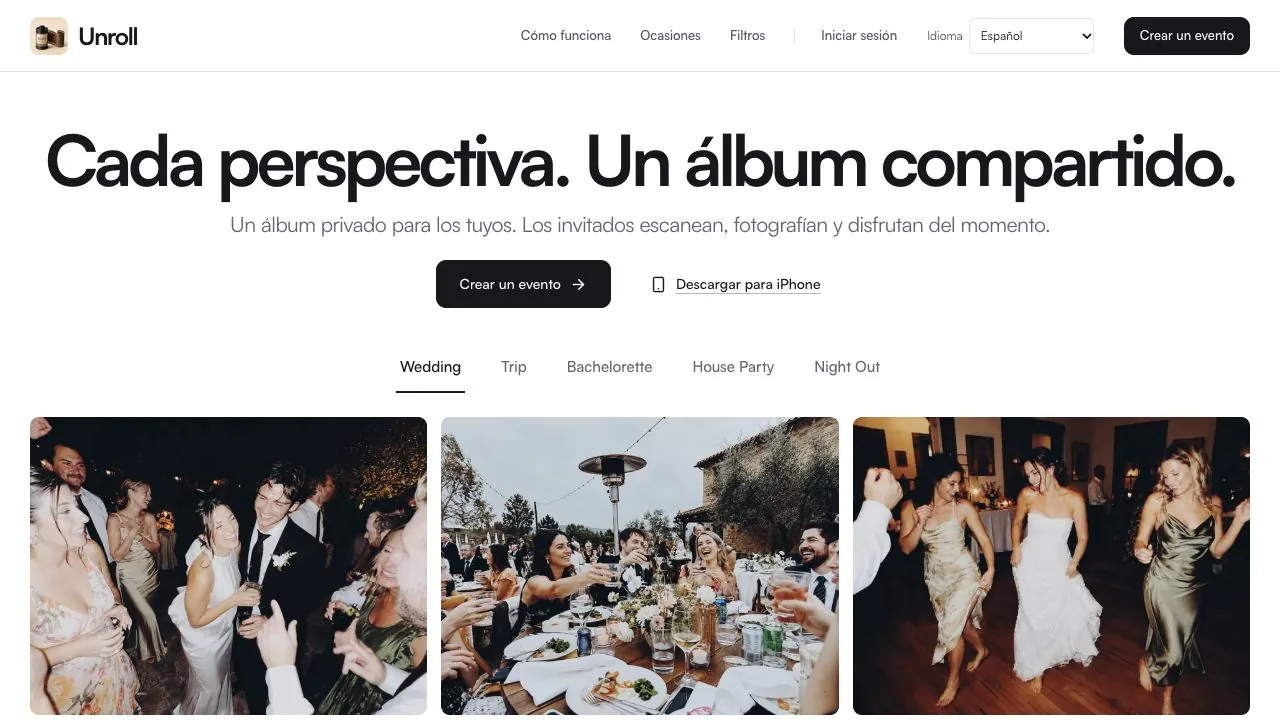
The same starting point, in Spanish.
- Find the language selector at the top of the homepage.
- Choose Español to see the welcome message and key navigation in Spanish.
Live Unroll website captured October 5, 2026. Some occasion labels remain in English. The photos are illustrative website imagery, not a customer event.
Tap the screen to take a closer look ↗A little less second-guessing
The October 2 website update extends translation to key sign-in, invitation and gallery controls. These are the moments when a familiar label can help someone understand the next step: entering an event, finding photos or moving through an album.
Arabic also uses a right-to-left page direction. The language choice is about how the website presents its controls; it does not translate the contents of photos or the event names people choose.
What to expect today
This is a step towards a more welcoming website, rather than a translation of every page. Some descriptions, occasion labels and other copy still appear in English. This journal article is in English too.
The improvements described here are available on the website. Language options in the iPhone and Android apps can differ.
Before sending a friend to Unroll, try their preferred language yourself. Point out the selector and the button they need next. That small bit of preparation can make the first visit easier, leaving more room to think about the gathering and the photos you want to keep.