For hosts · Looking back · September 20, 2026
A photo invitation should feel like an invitation

At a birthday dinner or a wedding weekend, the best photos often come from the people beside you. Inviting them to take part should feel easy. It should also be clear who you are letting in.
A clearer boundary around your gathering
Unroll’s September 20 web update made private invitations the default way into an event. A bare event address is no longer enough to join or open its gallery. Guests need the invitation and the guest access it establishes.
For a host, that makes the invitation the thing to share deliberately. You can send it to your group before the gathering or make its QR code available at the event. Treat it with the same care as an invitation to your home: a person who receives it can pass it along. Private does not mean impossible to forward.
Before the first guest arrives
Share the full invitation from Unroll rather than copying a shortened event address. If you are printing a QR code, test that code before putting a copy on every table. Open it the way a guest would and check that it leads to the right event.
Keep a digital copy handy for someone who cannot scan the printout. A quick message to the right person is more useful than making an invitation publicly searchable.
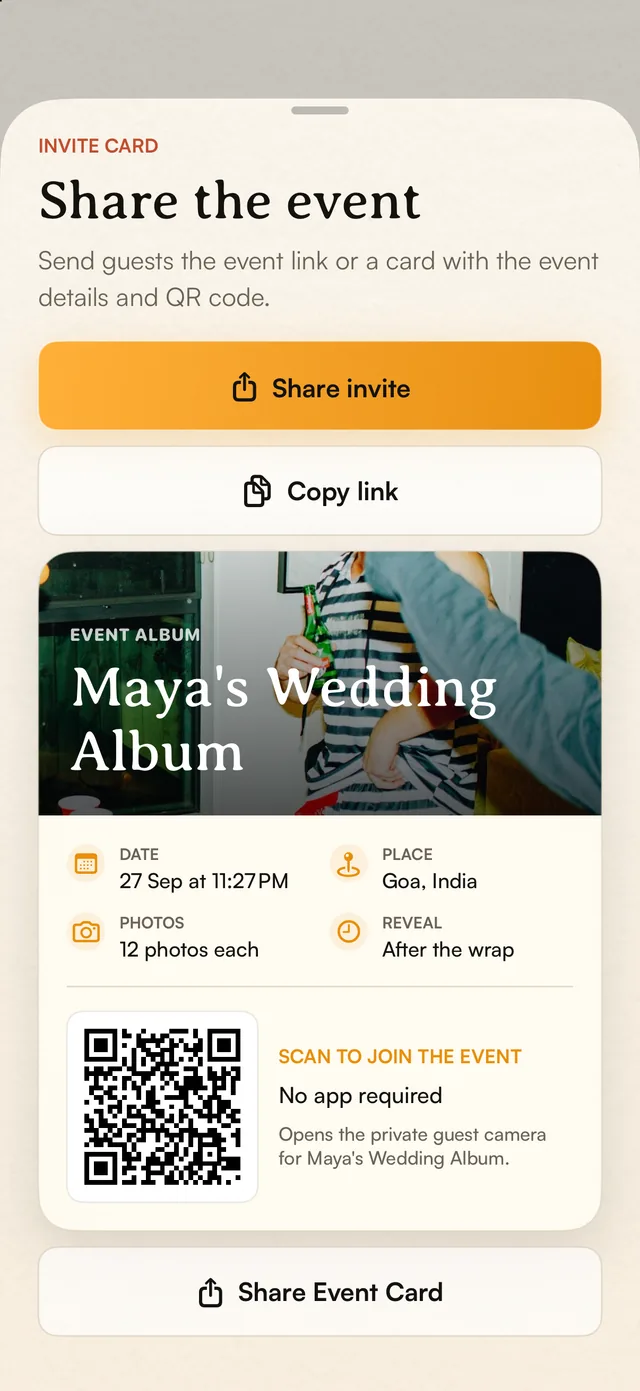
One invitation. Two easy ways to share.
- Use Share invite to send the invitation to your people.
- Copy link gives you the invitation to paste into a message.
- The event card puts the time, place and QR together.
Unroll iOS app · Sample event captured September 20, 2026. The QR shown is a demo fixture.
Tap the screen to take a closer look ↗Let the photos follow the pace of the occasion
The invitation update preserved existing reveal settings. Getting access to an event does not have to mean seeing every photo immediately. If your event uses a delayed reveal, tell guests when they can expect the pictures so the wait feels intentional.
This is especially useful for a celebration where you want people to take a few pictures, put their phones away and return to the conversation.
What this improvement means for you
The change is about making the boundary around an event clearer while keeping invited guests part of it. Existing guest access was preserved during the rollout.
This retrospective describes the website and event-service update confirmed live on September 20. Mobile app releases followed their own store review schedules. Before your gathering, test your invitation on the devices your guests will use.